Credric
Purpose-built for PointClickCare provisioning

PCC provisioning,
finally automated.

Staff changes shouldn't mean hours in the PCC admin portal. Credric connects to your existing identity source — Entra ID, Active Directory, CSV, or self‑service — and handles account creation, updates, and offboarding automatically.
HIPAA CompliantCloud or On-PremEnterprise Security
app.credric.com/dashboard
312
Active Users
8
Provisioned Today
24
Jobs Completed
Recent ActivityJust now
SC
Sarah Chenprovisioned
success
JR
James Rodriguezupdated
success
EW
Emily Watsonprovisioned
success
MP
Michael Parkpending approval
pending
HIPAA Compliant
Enterprise-grade security
Features

Manual provisioning doesn't scale

Every new hire, transfer, and termination means someone manually creating or updating accounts in PCC. In high-turnover healthcare environments, that adds up to hours of repetitive work every week — and delays that keep new staff waiting.

Automated Provisioning

Automatically create, update, and disable PCC accounts as staff changes happen. No manual data entry, no delays waiting on IT tickets.

Works With Your Infrastructure

Not every organization is in the cloud — and that's fine. Connect Entra ID via SCIM, sync from on-prem Active Directory, import CSV/Excel files, or use the REST API. Credric meets you where you are.

Approval Workflows

Route provisioning requests through configurable approval chains. Role-based or user-specific approvers with auto-approval timers.

Care Team Portal

Agency staff arriving in 20 minutes? No problem. Care team leads provision last-minute staff from pre-built templates with one click — no IT ticket, no waiting. Configure automatic access revocation by hours, shift end, or custom window so temporary accounts never linger.

Access Reviews

Run compliance campaigns that reconcile PCC users against your identity sources. Detect drift, orphaned accounts, and unauthorized access.

Bulk Import

Upload CSV or Excel files for batch provisioning. Column auto-detection, row-level validation, and progress tracking for thousands of records.

AD Agent Sync

Deploy an on-premises agent for bidirectional Active Directory synchronization. Group monitoring, OU management, and writeback support.

Enterprise Security

AES-256 encryption at rest, TOTP and email MFA, facility-scoped RBAC, session management, and API key controls. Built for healthcare.

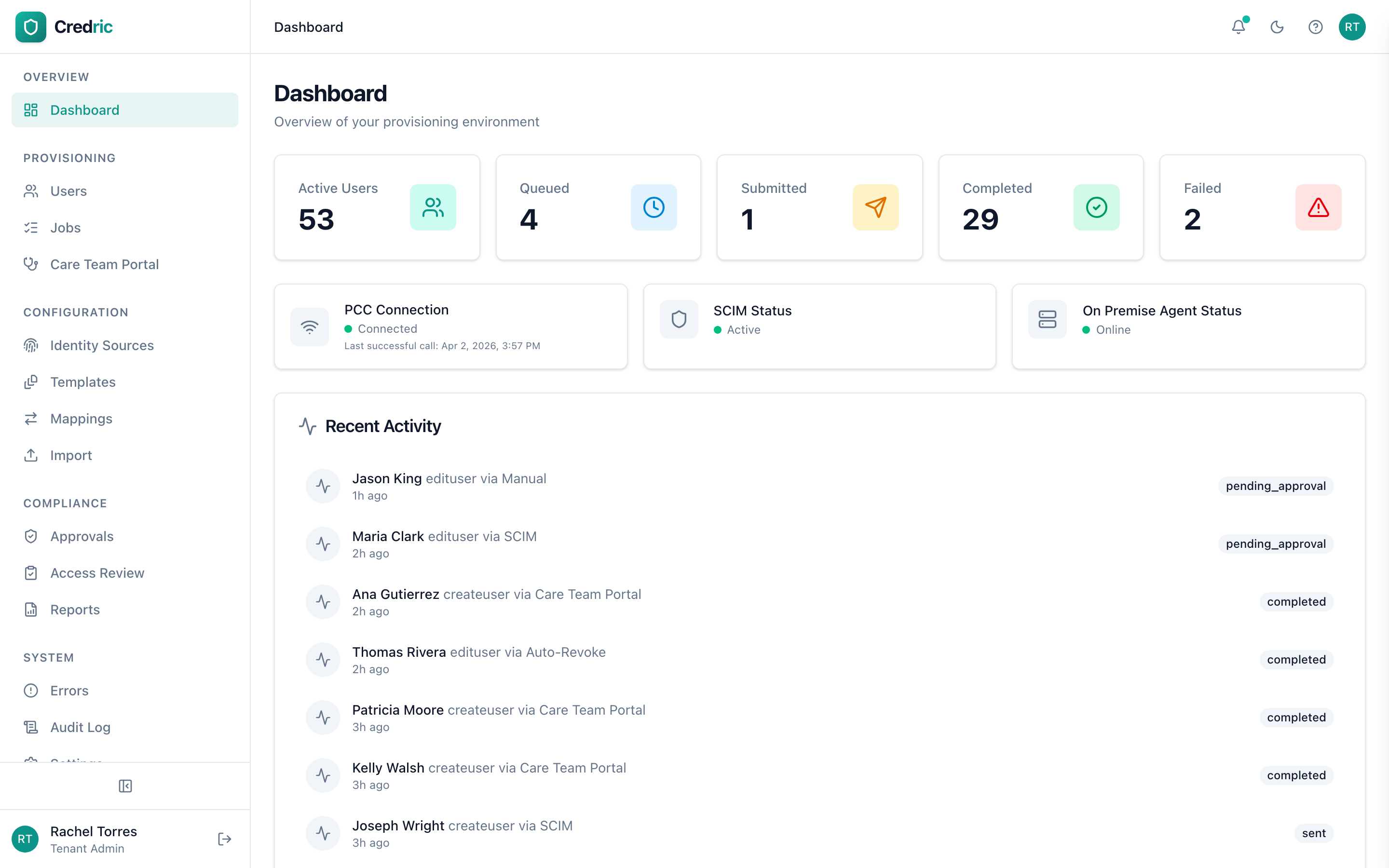
Real-Time Dashboard

Monitor provisioning health, success rates, pending jobs, and upcoming revocations. Activity feeds and trend analysis at a glance.

Multi-Facility Management

Manage all your PCC facilities from a single dashboard. Facility-scoped permissions, per-facility settings, and organization-wide audit trails — all in one place.

Field Mapping Engine

Map source attributes to PCC fields with direct, concatenate, template, computed, and static rules. Conditional logic for complex transformations.

Notifications & Webhooks

Email alerts for provisioning events, password distribution, and manager notifications. HTTP webhooks for custom integrations.

Care Team Portal

Agency staff show up.PCC access shouldn't be the holdup.

In senior living, agency staff are often brought in last minute — sometimes without formal processes and almost always without IT involvement. That leaves facility staff scrambling, and IT finding out after the fact that temporary accounts were created with no plan to remove them.

The Care Team Portal gives facility staff a controlled way to provision PCC access on the spot, with guardrails IT defines and full visibility into every account created.

01

Facility staff selects a template

A charge nurse or care team lead picks from pre-approved provisioning templates configured by IT. Each template defines the role, facility access, and permissions — no guesswork.

02

Access window is set

Choose a revocation window: 4 hours, 12 hours, end of shift, or a custom duration. When the window expires, Credric automatically disables the PCC account.

03

Account is provisioned in PCC

Credric creates the PCC account with the exact permissions defined in the template. The agency staff member is ready to chart within minutes of arriving on the floor.

IT stays in control. Facility staff stay unblocked.

IT defines the templates, permissions, and revocation policies. Facility staff use them. Every action is logged and auditable.

No IT ticket required

Agency staff often arrive outside of business hours. The Care Team Portal lets facility staff provision access on the spot — nights, weekends, holidays.

Full visibility for IT and compliance

Every account created through the portal is logged with who requested it, which template was used, when access was granted, and when it was revoked. Nothing happens in the dark.

Automatic revocation, every time

Temporary accounts are disabled automatically when the access window expires. No manual follow-up, no orphaned accounts, no audit findings from access that should have been removed weeks ago.

How It Works

From identity source to PCC in four steps

Replace the manual back-and-forth between spreadsheets, emails, and the PCC admin portal with an automated pipeline that works with whatever identity source you already have.

01

Connect Your Identity Source

Link Entra ID with SCIM auto-provisioning, deploy the AD Agent for on-premises sync, configure API keys for custom integrations, or simply upload a CSV.

  • SCIM 2.0 with batch buffering
  • On-prem Active Directory agent
  • REST API with tenant-scoped keys
  • CSV/Excel bulk import
02

Map Fields & Configure Rules

Define how source attributes translate to PCC fields. Use direct mappings, templates, concatenation, computed values, or conditional logic.

  • 6 mapping rule types
  • Conditional transformation logic
  • Reusable provisioning templates
  • Dry-run test harness
03

Validate & Approve

Every request passes through validation and optional approval workflows. Role-based or user-specific approvers with configurable auto-approval timers.

  • Row-level field validation
  • Configurable approval chains
  • Auto-approval timers
  • Manager notification alerts
04

Provision Automatically

Credric submits to PCC and tracks the async response. Users appear in PCC within minutes — with full audit trail.

  • Automatic message construction
  • Async response webhook handling
  • Retry logic with circuit breaker
  • Complete audit logging
Integrations

Connect any identity source

Whether you're fully cloud-native with Entra ID or running on-prem Active Directory — or even managing everything in spreadsheets — Credric connects to what you already have. No infrastructure overhaul required.

SCIM 2.0

Microsoft Entra ID

Real-time user provisioning and deprovisioning via SCIM. Automatic group-to-role mapping, attribute discovery, and batch buffering for high-volume orgs.

Auto-provisioningGroup syncSSO with OAuth2 PKCE
On-Prem Agent

Active Directory

Deploy our lightweight agent for bidirectional AD sync. Monitor groups, manage OUs, and write back provisioned attributes to Active Directory.

Bidirectional syncGroup monitoringOU management
Bulk Upload

CSV / Excel Import

Upload spreadsheets for batch provisioning. Auto-detect columns, preview data before processing, and track progress with row-level error reporting.

Auto-detectionRow validationProgress tracking
API Keys

REST API

Full-featured REST API with 60+ endpoints. Tenant-scoped API keys, filtering, pagination, and webhook callbacks for custom integrations.

60+ endpointsScoped API keysWebhooks
Self-Service

Care Team Portal

Built for last-minute agency staffing. Care team leads create PCC accounts on the spot from pre-approved templates — even at 2 AM when IT is offline. Set auto-revocation to 4 hours, 12 hours, end-of-shift, or any custom window. Accounts are automatically disabled when time expires.

Last-minute agency readyConfigurable auto-revokeNo IT ticket needed
Any Source
SCIM, AD, CSV, API, Self-Service
Credric
Map • Validate • Approve
PointClickCare
UAP • Async Response
Security & Compliance

Built for healthcare.
Secured by design.

Credric is engineered from the ground up for HIPAA compliance and enterprise security requirements. Every layer protects your organization's data.

AES-256 Encryption

All credentials, tokens, and sensitive data encrypted at rest with AES-256-GCM. Per-tenant encryption keys ensure complete data isolation.

Multi-Factor Auth

TOTP authenticator app support plus email-based one-time codes. Recovery codes for account access. Dual MFA for maximum protection.

Role-Based Access Control

Granular roles from organization admin to care team lead. Facility-scoped permissions restrict access to only relevant organizational units.

Complete Audit Trail

Every action logged with actor, IP, timestamp, resource, and full JSON details. HIPAA-grade 6-year retention with exportable CSV reports.

Access Reviews

Scheduled reconciliation campaigns compare PCC state against identity sources. Detect drift, orphaned accounts, and unauthorized access.

Data Isolation

Complete data isolation for your organization. Every query scoped to your account. Your data is never accessible to other organizations — by design, not by policy.

Session Management

HTTP-only cookies, absolute session lifetime, IP and user-agent tracking. No session tokens in API responses. Account lockout on failed attempts.

Auto-Revocation

Temporary access with automatic PCC account disabling. Template-based or per-user override windows. Scheduled cron enforcement.

HIPAA Compliant
Built for healthcare
Data Encryption
AES-256-GCM at rest
Global Edge Network
Powered by Cloudflare
Pricing

Simple, transparent pricing

Every plan includes full PCC integration, encrypted credential storage, and full provisioning pipeline. No hidden fees.

Starter

For single-facility organizations getting started with automation.

Contact Usper month
Get Started
  • Up to 500 provisioned users
  • 1 identity source (SCIM, CSV, or API)
  • Manual + template-based provisioning
  • Basic approval workflows
  • Audit logging (1-year retention)
  • Email support
  • Standard dashboard & reporting
Most Popular

Professional

For multi-facility organizations requiring full automation.

Contact Usper month
Get Started
  • Up to 5,000 provisioned users
  • All identity sources (SCIM, AD, CSV, API)
  • Care Team Portal with auto-revocation
  • Advanced approval chains
  • Access review campaigns
  • Active Directory agent included
  • Field mapping engine with conditional logic
  • Audit logging (3-year retention)
  • Priority email & phone support
  • Custom webhooks & notifications

Enterprise

For large healthcare networks with complex requirements.

Customannual agreement
Get Started
  • Unlimited provisioned users
  • All Professional features
  • Unlimited facility management
  • SSO with Entra ID (OAuth2 PKCE)
  • 6-year HIPAA audit retention
  • Custom data retention policies
  • Dedicated success manager
  • Custom SLA
  • White-glove onboarding
  • API rate limit customization

Need a custom plan? Talk to sales

FAQ

Frequently asked questions

Credric automates user account provisioning in PointClickCare (PCC). When staff are hired, transferred, or leave, Credric automatically creates, updates, or disables their PCC accounts — eliminating the manual data entry that consumes IT teams, especially in high-turnover healthcare environments. It connects to your existing identity source, whether that's Entra ID, Active Directory, CSV files, REST API, or a self-service portal.
Credric integrates with PCC through their official UAP web services. It handles all the message construction, field ordering, credential management, and async response processing. You provide your PCC service and messaging credentials, and Credric manages the rest — including PickList syncing for roles, departments, and facilities.
Yes. Credric is built from the ground up for healthcare. All credentials are encrypted with AES-256-GCM at rest, your organization's data is completely isolated, and audit logs are retained for up to 6 years per HIPAA requirements. Role-based access control, MFA, and complete data isolation are standard across all plans.
We know not every organization is running cloud infrastructure — and you shouldn't have to overhaul your IT setup just to automate provisioning. Credric supports five channels: Microsoft Entra ID (Azure AD) via SCIM 2.0 for cloud-first orgs, on-premises Active Directory via our lightweight sync agent for organizations still on-prem, CSV/Excel bulk imports for teams without a directory, a full REST API for custom integrations, and the Care Team Portal for self-service temporary staff provisioning.
Yes — that's exactly what the Care Team Portal is designed for. When agency staff show up on short notice, a care team lead selects a pre-approved template, fills in the name, and the PCC account is created immediately. Auto-revocation is fully configurable: set it to 4 hours, 8 hours, 12 hours, end-of-shift, or any custom window. When the timer expires, Credric automatically disables the PCC account — no manual cleanup, no lingering access, no IT ticket required.
Most organizations are up and running within a few days. Setup involves connecting your PCC credentials, configuring your identity source, and mapping fields. Our onboarding team handles the technical configuration, and Enterprise plans include white-glove onboarding with dedicated support.
Absolutely. Credric supports facility-level scoping so you can manage all your PCC facilities from a single dashboard. Assign facility-scoped admin permissions, configure per-facility settings, and run access reviews across your entire organization.
Credric uses a queuing system with automatic retries and a circuit breaker pattern. If PCC is slow or unavailable, requests are queued and retried automatically. You can monitor job status in real-time on the dashboard, and the system handles PCC's typical 15-minute async processing gracefully.
Get Started

Ready to automate
PCC provisioning?

See how Credric can give your IT team back the hours they spend on manual PCC account management — regardless of your infrastructure.

30-minute personalized demo
See your identity source connected live
Talk through your provisioning workflow
No commitment required

By submitting, you agree to our Privacy Policy. We'll never share your information.